The Simple Things Part Four – Removable Media

This is true Bring Your Own Security (BYOS) given that this really does fit in your pocket to “bring along”.

Everywhere you look in todays media, both in the infosec industry and mainstream media, there is yet another case of X thousands of records being lost on a memory stick by one organisation or another, and the trend seems to be getting worse. This is either because people are getting more careless (possibly) or the media is getting better at reporting it (probably). Either way, the brand and reputational damage alone is significant to any company, no matter its size.

There are two elements to this that are worth exploring:

Firstly, the prevalence of USB sticks is a part of the problem, they have become a simple commodity. They are on sale in newsagents, supermarkets and petrol stations, and are in peoples pockets, on their key rings and in hand bags. As a result it has become very natural to share files, photographs and anything else using them, and that familiarity has drifted into the workplace, especially when they are handed out at trade shows and demanded from IT departments. The problem is that they are not even basically secured, and that has become acceptable to the average person in the street.

Secondly, the media has found the “loss” of data a rich source of column inches to help sell their newspapers. The ironic part however is that in many cases when you read the back half of the story away from the headline, it transpires that the memory stick was in fact encrypted and would take the collective might of at least North Korea five years to break into.

So we have a dichotomy; a prevalence of unencrypted memory sticks in the marketplace, and the tendency therefore to assume that all memory sticks are insecure and report them as such.

The solution in a BYOS environment is simple – only buy encrypted memory sticks! It only needs to be a one time investment (my personal preference is the IronKey), and relegate all of your old memory sticks to the bin (or your favourite computer recycling facility of course). If cost is an issue (and they are more expensive, then use something like TrueCrypt (www.truecrypt.org) to encrypt your existing sticks and an be sure to keep using it. trueCrypt even has a portable mode that allows the executable to reside on a smaller unencrypted partition of the drive allowing it to be used on other systems.

By making a habit of only using encrypted portable media we all move one step closer to the concept of BYOS.

The Simple Things Part Three – Screen Privacy Filters

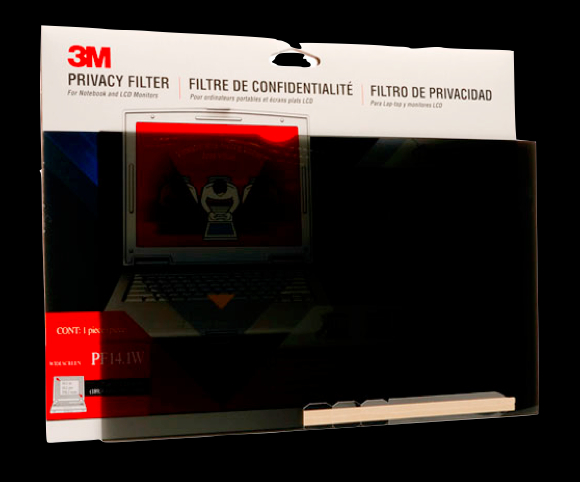
Continuing on the theme of Bring Your Own Security (BYOS), the use of a screen privacy filter makes a huge difference in someone’s ability to work in public spaces privately.

There are many different manufacturers of these filters although the best known (and possible inventor?) of them is 3M. Basically they use a “micro louvre” system to ensure that when placed onto the screen the image can only be viewed from directly in front. Someone sat next to you can not see the screen at all, just a black image. The louvres work in a similar way to venetian blinds but in a vertical arrangement; when they are open you can see through them but the moment you move to one side the blind slat itself blocks the way. The principle is the same in the filter – vertical slats that allow enough light out to see the image but block the view fro the side.

As a technology they are very simple, albeit expensive – you can expect to pay upwards of £50/$70USD for a 3M one. That seems rather expensive, so what are the real world benefits?

Most people nowadays will travel for over an hour to their place of work, and with the increasing number of people using a laptop as their primary computer, that travel time can be more effectively utilised by working. Being able to do so without fear of someone viewing the strategy or bid document you are working on gives great peace of mind. Without wishing to countenance the transport of sensitive/confidential documents in open, it does provide an extra level of protection in addition to encryption etc..

Social engineering is also significantly reduced. Someone wishing to engage in a conversation with you to get hold of information has ready access to your screen for topics, interests, even personal details (from your wallpaper?) and has a “hook” to start that conversation. By blocking that view, they have to work much harder for those personal details.

There are downsides to using a screen filter though;

Risk homeostasis, i.e. you begin to think nobody can see your screen, and so let your guard down elsewhere. Bearing in mind that you can only view the screen from directly in front of you, that means that the person peering from between the seats directly behind you can also see the screen.

You are also highlighting the fact that you have something worth looking at! I have experienced interested stares from people in a restaurant in Washington D.C., (where I thought security techniques such as a screen filter would be de rigour) as they saw the lovely golden sheen on my new 3M filter; it was gold as it allegedly helped increase the clarity and privacy at the same time. i certainly drew attention to myself!

Of course the Pros far outweigh the Cons, and so for me the inclusion of a screen filter into my BYOS arsenal is certainly one of the most important pieces of kit to have.

As an aside, filters are also available for phones and tablets. I have one on my iPhone and it is very effective when holding the phone in portrait. If I need to show someone something on my phone i simply rotate it to landscape, and people either side of me can see the screen fully.


The Simple Things Part Two – Encryption

I have often said that encryption is like the anti-virus of twenty years ago, just without Doctor Solomon’s socks (that comment in of itself shows my age and when I first started in IT!). What I mean by that is twenty years ago when viruses first started to appear in their hundreds, anti-virus products started to appear in earnest. Not everyone bought or licensed an anti-virus package because they were expensive and the threat was also somewhat small. When it was licensed in the enterprise it was normally a low cost “detection” package that was rolled out onto the desktop with only a few of the expensive “removal packages” in the IT department to carry out the actual disinfection. Home use of anti-virus was virtually unheard of.

Roll forward nearly two decades and anti-virus is everywhere. It is on your computer when you first buy it, it is on every corporate machine (even the OSX environments) and there are even free versions. Everyone, everywhere has an anti-virus package, and only the most foolhardy or ignorant won’t have one installed (although it won’t take long before a trashed disk from a virus or malware will persuade them!).

This is not unlike the case today with encryption. I have come across many small to medium sized organisations that do not have any kind of encryption on any portable device, let alone their laptops, and home use is virtually non existent amongst my friends and colleagues (my peers in the info sec industry are obviously a little more ahead of the game!)  I do believe we are in the middle of a sea change however, but it is a slow, organic change similar to the anti-virus evolution.

I know there are many “encryption” companies out there that do a basic full disk encryption (FDE) package, but off the top of my head I can only name four:

  1. Symantec (PGP)
  2. TrueCrypt (Open Source)
  3. BitLocker (Microsoft)
  4. FileVault (Apple)

For the average user, and indeed many businesses, that is not a huge choice. Even companies that have Windows 7 and Lion installed, the encryption element itself is not automatically turned on, and with Apple there isn’t even any kind of centralised key management (unless, of course, you wish to trust Apple with the keys to your kingdom).

For me, it is simple; encryption must be a part of the full IT procurement cycle. It needs to be budgeted for in the lifecycle of any computer purchase, and in the case of the enterprise, key management needs to be as normal and as natural as Active Directory management. (That same rigour then needs to be applied to removable media as well). Education in the proper use of it is essential (when a laptop is running or suspended it is effectively unencrypted, when it is switched off it is encrypted), and the inclusion of desktops is essential. After all, hard disks get stolen or sent to the disposal company accidentally without being wiped…

Home use also needs to be targeted – only when encryption capabilities are as ubiquitous as anti-virus will a change occur in the way we use computers both at home, schools and work, because users will demand it. The theft of computers from homes opens up all kinds of issues regarding credit card, password and identity theft.

As with all of the things in this list, encryption is not a panacea, but it is an important tool that needs to become as natural to use as a knife and fork, or perhaps more appropriately, as acceptable as anti-virus. What price must be paid in lost data before encryption becomes the rule, rather than the exception?


When Security Collides With Life

I will explore this in more detail in a later post or presentation, but I have just had a very engaging conversation regarding what we all lose when we think too much about security. My colleague was expounding the joy of sharing free wifi amongst his neighbours when of course I (in my role as the security chappy) immediately informed him of the number of cases of people being arrested because someone was downloading illegal content from their unsecured wifi connection (see http://bit.ly/yiy8QW  as an example, albeit in the USA although Google gives plenty of other examples), and confidently informed him they securing his wifi was the only sensible course of action.

His response was robust and convincing, and initially threw me off guard; ” I would prefer to share my wifi amongst my community than to close it off against the tiny chance of it being abused”. He then summed  it up in terms that really made sense to me; “I prefer to actively engage with these kinds of risks than to isolate myself from them and lose the multitude of benefits it brings me”. Initially I couldn’t accept this. Why on earth is someone willing to open themselves to these kinds of risks, where even the hint of wrong doing can ruin a persons life? Then I realized I deal with this in exactly the same way in my day job; risk acceptance.

Everybody’s attitude to risk is different. Indeed every company and every senior management team has a different attitude to risk, and the line that is drawn between an acceptable and an unacceptable risk is a moveable feast, even within the same organisation. My colleagues attitude is that of a risk happy organisation, mine is that of a risk averse organisation.

And to think, I had never considered myself risk averse until today!


The Simple Things Part One – The Lock Lead

ImageWhy is the humble lock lead the first item in my top ten? Many people would complain it is a pain in the backside to use day after day, that it can’t provide that much protection given the tiny connection to the laptop in the small rounded rectangular hole, and the cable must be pretty easy to curt through, so why bother?

Let us look at the two main aspects of lock leads, namely the physical aspect (how strong, reliable etc) and also the deterrent aspect (will it put people off?).

1. The Physical

There are good quality, well made lock leads and there are bad quality, poorly made lock leads. Make sure you choose the right one. How do you choose? Look for recommendations, and also purchase range of them and try them out yourself. Some can be opened with a rolled up business card, and some can be snapped off with a sharp turn of the barrel using a pair of pliers. My current favourite is the Compu-Lock lead, http://www.compu-lock.com (I have no business or personal interest in the success of this company but the lead they produce meets many of there criteria I lay out in this article). You of course may fall to one of the other major manufacturers.

The cable itself (at least in a good one) is made of stranded hardened steel (allowing flexibility with strength) and covered in a durable plastic coating that also provides initial protection from cutting (such as with pliers). The construction is very similar to a bike lock albeit thinner, and although it can be cut it takes some considerable effort with hand tools. I have tested this with a lower specification cable, cutting through it in just under two minutes with a pair of snips; it took a considerable amount of effort and grunting to do so, and I was still left with a “tail” attached to the laptop. The better specification cables will take significantly longer.

The lock itself is also important. Kensington came under fire some years ago (somewhat unfairly) when many of their locks were shown to be susceptible to Bic biro barrels and rolled up business cards being forced into the key hole to take the shape of the key and subsequently open the lock in a matter of seconds. This problem went beyond laptop locks and affected other barrel lock manufacturers for bikes etc.. Although the problem has been solved, I still feel wary of these types of lock, albeit without foundation! As an enterprise you will want a lock that provides master keys specific to your organization, something that is not always easy to find, especially in the lower end of the market.

Finally, the fit is important. Many locks will connect with the laptop but then be loose. Some try and overcome this with rubber flanges which is ultimately useless. the problem a loose lock poses is that if the gap is big enough to get a hacksaw into you can attack the pin(s) that lock it, or even worse get a good grip and twist the barrel to break the pins. The better locks will have an adjustment mechanism that ensures the barrel is tight against the laptop meaning there is significantly less leverage and no gap to cut through.

2. The Deterrent

So you have the Rolls-Royce of locks in your possession… there are a numbers of things to bear in mind to ensure its effectiveness.

Firstly, you have to use it! Time after time I see them looped into a desk and then not connected to the laptop. FAIL on all counts. Use it all day, every day; in the office, hotel room, client site, even in the boot of your car if you have to leave it in there for whatever reason (avoid this last one at all costs though!).

Secondly, given it will not put off a determined attack, it should not be left overnight in your office for instance. Their primary use is as a casual theft deterrence; any thief in a time pressured situation (perhaps during a fire evacuation drill?) will not bother with the laptop that is locked and move very quickly onto the one that isn’t. If somebody has the luxury of thirty, undisturbed, minutes in the middle of the night they may think differently as well as be equipped for it! Always take your laptop home; if nothing else it is a very effective contributor to your company’s BCP initiative!

Finally, having the lock leads helps keep you in a security mindset (hopefully without becoming paranoid!). It is a constant visual reminder of the need for security, and if it reminds you to lock your screen every time you step away for a coffee then you have doubled the value of the lead straight away.

In conclusion, the lock lead has to be one of the most simple, best value and effective data loss prevention tools available. It’s use will significantly reduce the potential for theft of not only the physical device, but the cost of replacing the laptop, the data, the time in getting everything back and potentially a front page spread in a national newspaper;” Company X loses One Million Public Records“.

Surely £25 is worth avoiding that?