European Security Blogger Awards 2013 – a Thank You and an important tip

The Beautiful Trophy Itself

One of the Shiny, Beautiful Trophies

Just over a week ago the good, the awesome and the rockstars of the European blogging scene centred upon the the function room of the Prince of Teck pub in Earls Court for the inaugural European Security Blogger Awards of 2013. The atmosphere had a nervous tension and a strong feeling of anticipation (as well as a few bow ties for some other award going on immediately after that night!). These awards would not have happened if it wasn’t for two gentlemen in particular, namely Jack Daniel (@jack_daniel) and Brian Honan (@brianhonan) and without the sponsorship of Tenable (for the bar) and Qualys (for the trophies themselves). Both of them organised this off their own backs, were extremely gracious hosts and ultimately did this for the betterment of the European infosec community, and I wish to recognise that formally.

Thank you Jack and Brian, and to our sponsors.

But moving onto the awards themselves; after an initial round of blind nominations, the finalists were announced on Saturday 13th April and a no doubt frenzied bout of voting commenced, interspersed by all the finalists vying for your votes. My favourite had to be this one from Kai Roer (@kairoer), someone certainly not known for his modesty!

Kaibloggeraward

But aside from my evil twin shamelessly and quite rightly asking for votes (he has a great blog, check him out!) there were regular reminders and links from Brian and Jack to get voting and many retweets. I’m not sure how many votes were cast but I imagine they were well into the hundreds.

And so the night came, and after a day at Infosecurity Europe just over the road, and the practising of our “disappointed we didn’t win but SO happy for the winner” faces, it was down to Jack to announce the nominees and winner. They are listed below, but before that I want to move onto the tip I promised in the title…

Below are links to some of the smartest minds in our industry, and not only that, but they are willing to share their knowledge with you, for free. In any industry that is a rare gift to be given so I would like to encourage everyone who reads this to visit some of these blogs and follow them on Twitter, and also actively participate in the discussions, opinions and (dare I say it) thought leadership that is being presented. As a blogger myself I know the thrill of discussing a topic with someone, whether they agree with me or not. If you disagree with something that is being said, then politely and respectfully say so and put your point across. Even a simple message of support or a ‘Like’ means these people are going to be more likely to continue to blog and share their ideas with you in the future. And of course, if you think you can do better we would welcome you with open arms; this is not an exclusive club.

And so, without further ado, and a final thank you to Brian and Jack, here are the results of the European Security Blogger Awards 2013!

Best Corporate Security Blog
Malware Must Die
Sophos Naked Security Blog  < WINNER!
F-Secure Labs Blog
Countermeasures
SecurityWatch
SCRT Information Security
Cyberis Blog
Security for UK Legal Professionals
Holistic Security Blog
Securelist

Best Security Podcast
Finux Tech Weekly 
Eurotrash Security Podcast  < WINNER!

Best Security Video Blog
Christian008
Info Cynic < WINNER!
Security Tube

Best Personal Security Blog
Chat Back Security
Neira Jones
/Dev/Random
Pentest-n00b
The Roer Information Security Blog
SecurityWatch
Make IT compliant – Security and Compliance
Naked Security
Thom Langford  < WINNER!

Most Entertaining Blog
The Gentleman Hackers Club
Info Cynic  < WINNER!
Sophos Naked Security Blog
Holistic Security Blog

Most Educational Blog
Sophos Naked Security Blog
Infosec Cynic
HTML5 Security
Security Watch  < WINNER!
Securelist
Holistic Security Blog
Professor Alan Woodward Blog
Offensive Coder
Bruce Hallas 

Best New Security Blog
Jitender’s blog
Advent IM Security For Schools
Chatback Security
Marlin Brighton Blog
Dave Waterson on Security  < WINNER!

Best EU Security Tweeter
@rik_ferguson < WINNER!
@jameslyne
@_securitycat
@ChrisJohnRiley
@quentynblog
@j4vv4d
@brianhonan
@xme
@securityspeak
@gcluley
@n0x00
@0x6D6172696F
@mikko

Grand Prix Prize for the Best Overall Security Blog
Sophos Naked Security Blog < WINNER!
Infosec Cynic
F-Secure
Security Watch
Light Blue Touchpaper
Holistic Security Blog
Didier Steven’s Blog
Bruce Hallas 

If you made it this far you may have noticed I was very honoured and pleasantly surprised to have won Best Personal Security Blog, and against some real industry heavyweights too. My thanks to all of those that voted for me, it means the world to me.


Getting Your Hands Dirty

dirty-handsIn my last post I referred to ensuring that your risk management programme is producing the quality of output to ensure the business information it feeds into is of the highest quality; maintaining the integrity of your programme.

If there is one thing that can be done to improve the integrity of your risk assessments it is simply to get your hands dirty during them. I have had a number of conversations with people who have been on the receiving end of an assessment where the assessor simply sits at the table and asks for evidence in the form of documentation, verbal responses or even just PowerPoint presentations to confirm the effectiveness of the information security programme in question. Personally I have sat in a conference room for one or two days at a time and only left the room for a short thirty minute ‘walkabout’. Quite how the assessor felt they were getting a representative view of what we were doing was beyond me.

There are a number of problems with this hands off approach:

The ability of those being assessed to ‘play’ the assessor increases with their reluctance to physically move around the organisation. Pre-prepared evidences (the so called “audit box” as was once described to me) can be made available, the organisations SME’s can be wheeled in to ensure the right things are said at the right time and the people who never seem able to say the right thing at the right time (and every organisation has them!) can be told to work in a different building that day.

Secondly, unless the assessor is actually looking at the evidence first hand, even down to rifling through the physical pieces of paper or reviewing server logs, there is absolutely no way any kind of discrepancy will ever be found. Of course this is a sampling exercise, and of course there is no way every single piece of evidence, paper or electronic can be reviewed, but some kind of benefit can be gleaned from going though them. Quite apart form anything else it gives the clear impression that “no stone is unturned” during the assessment process. I have come up with a surprising number of findings from simply taking a few minutes to look through large piles of paper records.

Finally, and perhaps slightly more esoterically, the action of a walkabout can give a very good “feel” for a place. If the presence of the auditor brings hurried and furtive glances everywhere they go, it may give the indication of nervousness or unwillingness regarding the assessment (or of course just a healthy distrust of strangers). If there are rows of empty desks that are obviously normally in use but seem to be vacated for the day this may give the indication that special plans have been laid on for the assessment (or that the sales team are in a meeting). This last point is not so clear cut as the other two, and should only be used as an indicator of what is already coming out of your assessment, but it is a useful one nonetheless.

I have a colleague who every time he enters a “serious” meeting, he undoes his cufflinks and rolls up his cuffs a couple of times; this is his way of mentally preparing for the challenge ahead by literally rolling up his sleeves. When it comes to risk assessments that is exactly what you need to do, and then prepare yourself to get your hands dirty.


Style vs Content – Getting the Point Across Effectively

I have just had to present to a team on their information security responsibilities whilst they are on their current project. Their client has very specific requirements, and for a variety of reasons it was important to reinforce the key requirements again.

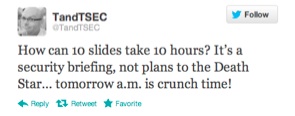
This was at short notice, and so I spent every spare moment I had throughout a long day last Thursday creating the presentation from scratch. After reviewing Master Services agreements, security schedules and other documents relating to the project I had to try and consolidate all of this into a meaningful presentation. I even Tweeted about my experience:

This is a battle hardened and very creatively talented team, working stupid hours and closing in on an important milestone of work. The last thing they wanted was to listen to the “corporate security guy” for twenty minutes, but for all the right reasons it was important that it was done today, and with the client present.

So I had: 1 – a disengaged audience, 2 – 24hrs notice, 3 – a client present, 4 – strong interest from HQ (“send us the presentation when you finish it so we can check it through” and finally, 5 – changes to be incorporated two hours beforehand (see 4).

Pop Quiz – do you use the corporate deck, smart and extensive bullet points, approved imagery and and a shirt and tie? Or do you focus on getting key message across, come what may?

And this is the crux of my point – the moment you try and deliver a corporate message in a corporate format your audience is going to switch off. One suggestion I received from a well meaning executive was to basically provide a list of the twenty requirements of the client in the presentation and then hand out copies to be signed by each team member. In this instance people would remember the first two, last two (at best!) and just blindly sign the rest. While this would technically meet the objectives (everyone must agree they understand the security requirements) they really wouldn’t absorb the message.

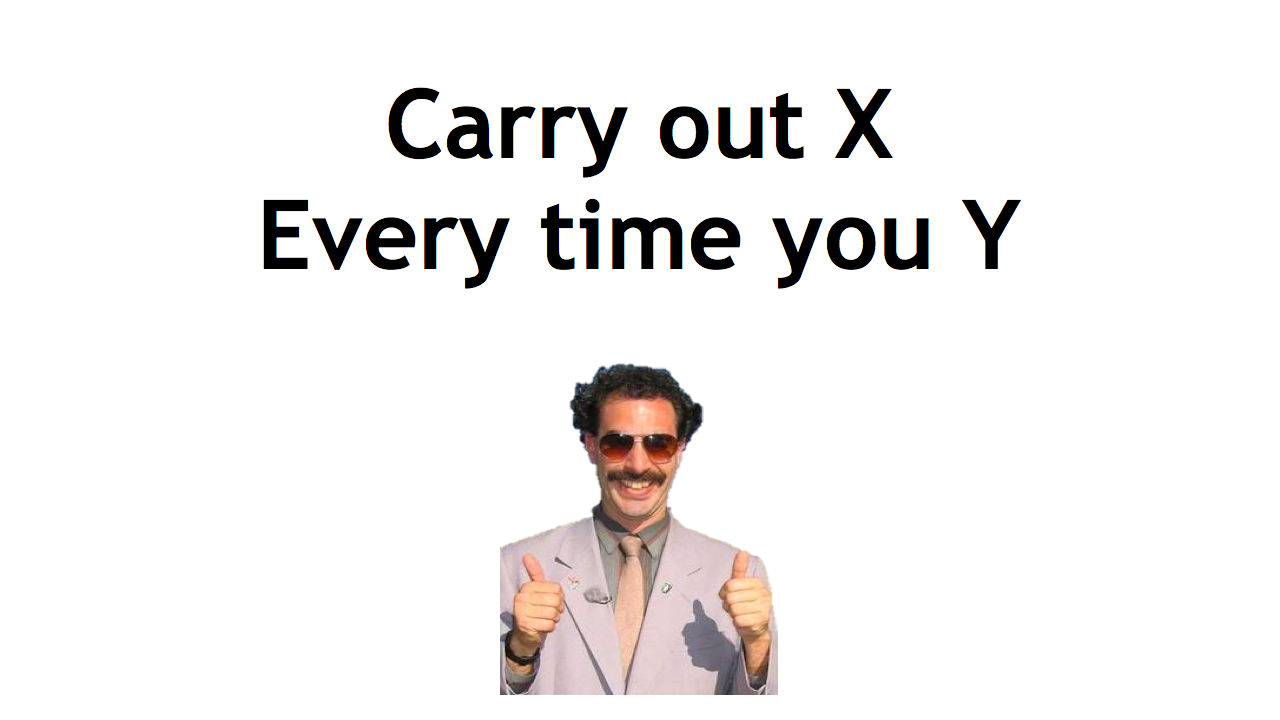
My approach? Simple, high impact and memorable. As the example below shows, not many words and a memorable picture (in the actual presentation Borat merged to Simon Cowell showing a thumbs down and back and forth). In this way, the image hits them first (thumbs up/thumbs down), the message (check X when doing Y), and that’s it! (The message has obviously been sanitised to protect the innocent).

 Of course, there were many other slides along this nature – I also used references to The Oatmeal, Dilbert and Defcon 18 amongst others. And each slide put across a very specific point.

At first glance, the deck looks awful, plain and badly designed. However, the simplicity of it ensures the message very clearly comes across with the imagery ensuring that message remains memorable.

Three things came across very strongly at the end. Firstly, the questions and comments at the end were engaging, sensible and eminently relevant. This made me very confident that the message was put across and understood, and that this approach was the correct one in this circumstance.

Secondly, the client saw this engagement, and has since requested a copy of the presentation to demonstrate how the team had been successfully “trained” and and updated on security practices.

Finally, in front of this creative audience it became crushingly obvious that I really have to up my game when it comes to clip art…


The Simple Things Part Two – Encryption

I have often said that encryption is like the anti-virus of twenty years ago, just without Doctor Solomon’s socks (that comment in of itself shows my age and when I first started in IT!). What I mean by that is twenty years ago when viruses first started to appear in their hundreds, anti-virus products started to appear in earnest. Not everyone bought or licensed an anti-virus package because they were expensive and the threat was also somewhat small. When it was licensed in the enterprise it was normally a low cost “detection” package that was rolled out onto the desktop with only a few of the expensive “removal packages” in the IT department to carry out the actual disinfection. Home use of anti-virus was virtually unheard of.

Roll forward nearly two decades and anti-virus is everywhere. It is on your computer when you first buy it, it is on every corporate machine (even the OSX environments) and there are even free versions. Everyone, everywhere has an anti-virus package, and only the most foolhardy or ignorant won’t have one installed (although it won’t take long before a trashed disk from a virus or malware will persuade them!).

This is not unlike the case today with encryption. I have come across many small to medium sized organisations that do not have any kind of encryption on any portable device, let alone their laptops, and home use is virtually non existent amongst my friends and colleagues (my peers in the info sec industry are obviously a little more ahead of the game!)  I do believe we are in the middle of a sea change however, but it is a slow, organic change similar to the anti-virus evolution.

I know there are many “encryption” companies out there that do a basic full disk encryption (FDE) package, but off the top of my head I can only name four:

  1. Symantec (PGP)
  2. TrueCrypt (Open Source)
  3. BitLocker (Microsoft)
  4. FileVault (Apple)

For the average user, and indeed many businesses, that is not a huge choice. Even companies that have Windows 7 and Lion installed, the encryption element itself is not automatically turned on, and with Apple there isn’t even any kind of centralised key management (unless, of course, you wish to trust Apple with the keys to your kingdom).

For me, it is simple; encryption must be a part of the full IT procurement cycle. It needs to be budgeted for in the lifecycle of any computer purchase, and in the case of the enterprise, key management needs to be as normal and as natural as Active Directory management. (That same rigour then needs to be applied to removable media as well). Education in the proper use of it is essential (when a laptop is running or suspended it is effectively unencrypted, when it is switched off it is encrypted), and the inclusion of desktops is essential. After all, hard disks get stolen or sent to the disposal company accidentally without being wiped…

Home use also needs to be targeted – only when encryption capabilities are as ubiquitous as anti-virus will a change occur in the way we use computers both at home, schools and work, because users will demand it. The theft of computers from homes opens up all kinds of issues regarding credit card, password and identity theft.

As with all of the things in this list, encryption is not a panacea, but it is an important tool that needs to become as natural to use as a knife and fork, or perhaps more appropriately, as acceptable as anti-virus. What price must be paid in lost data before encryption becomes the rule, rather than the exception?