10 Rules of Risk Management… In 10 Movie Quotes

I had an absolute blast last night presenting at the Acumin RANT forum (https://www.rantforum.com) on the topic of “10 Rules of Risk Management… In 10 Movie Quotes”. The premise was simple – people don’t remember rules or dull facts, but they do remember things that emotionally touch them in some way. Each quote and movie opened up a conversation on an aspect of risk management (although the term “rule” was a little inaccurate of course). Given it was the RANT forum, and I was competing for the attention of the audience against the allure of a free bar, there was plenty of opinion and discussion flowing around the room throughout. Hopefully a few of the points I was trying to make will have stuck as a result of quotes such as “You’re gonna need a bigger boat” or “I see dead people”.

I felt the audience engaged and participated throughout with lots of very verbal agreement and disagreement throughout, and it was exciting to be right at the centre of the maelstrom. If you have never been to a RANT before just imagine one person being surrounded by a large number of people only a few feet away; with your back to the projector screen, there is no lectern to hide behind and no stage to stand on. It’s do or die, and a  #Fail never far from your thoughts!

Not everyone agreed with the points I was making of course but that just generated further conversation. I had some excellent follow up conversations with a number of people, including a great idea for my next presentation which a stated up front I might shamelessly steal – I think i got his agreement that doing so was OK! I had some very positive feedback afterwards as well for which I am very appreciative of; if you are reading this and want to provide more feedback, of both kinds, then please do. Without wishing to sound too “new age”, feedback is a gift you can give someone that will allow them to grow and improve. Without it we continue to make mistakes and miss the opportunity to learn.

Gemma (from Acumin) and I tried something new this time as well, filming the presentation with two cameras. It will take me a few days to splice the footage together, but as soon as it is done I will have it posted here. I know some of those who attended were interested in both reviewing and sharing the footage, as well as the slides; these are below, as well as a slideshow of the deck. I use Keynote  for my presentations, so the PowerPoint conversion is never a true representation. If in doubt, use the PDF. Someone mentioned last night that they may want to link to the content here too. I have no objections to this, just credit me and don’t muck about with the content!

My thanks to Acumin for hosting the evening, and thank you to all of you who took part, especially the very lucky prize winners! (If you wanted a pen but didn’t get one let me know and I will do my best to send one to you).

This slideshow requires JavaScript.

Files for download:

PDF – 10 Rules of Risk Management

PPT – 10 Rules of Risk Management

Keynote – 10 Rules of Risk Management (native)

Movie from the evening – Coming Soon


May I Ask YOU A Question Or Two…?

The iPhone5 launch is very exciting for many people, and I have to admit myself included. Whatever your opinion of that particular can of worms, one thing is for sure, and that is many people will be parting with a lot of money in the next week or two in order to get hold of the latest piece of geek chic.

When there is a likelihood of a money changing hands, scammers and criminals will never be far behind.

I took a phone call (from a UK 0845 number) on my mobile phone on Saturday from someone claiming to be from O2, with an offer to get the new iPhone5 on the day of release without having to queue for hours at my local O2 store. They would even honour the lower retail store price compared to the order online price; on my tariff that meant £70 for the handset rather than £100 because I was a good customer (which I am). What an offer!

Without thinking, I confirmed the first line of my address… and then thought “Oh crap, shouldn’t have done that”; I got a bit carried away. They had called me, not the other way around, I really had no idea who they were!

Cast your mind back a few years ago, and there was a semi legal scam whereby people would take calls from “a representative from <insert mobile provider here>”. They would entice the individual with early upgrades and a new phone, get the verbal agreement, and then shift the contract to a new, third party provider. The downside was that this provider had many hidden charges and an average £25 bill would become £125 overnight partnered with a legally binding contract. This was soon clamped down upon, but this example starting to ring through my mind!

It was at this point that I had verbally agreed that I wanted the new iPhone delivered to my door on a new and cheaper contract this coming Friday… Oh dear God, Have I just committed professional suicide here?!

I turned on my professional brain, and then asked the person at the end if she really was from O2, and obviously she replied “yes!”. So I asked her if she would mind if I asked her a few security questions “of course not, I would do the same!”. i logged onto my O2 account and asked her for my account number, last bill amount and how long I had been a customer. She had all of the information to hand, I was happy, and I am now looking forward to a new phone on Friday (either that or this blog will be closed down on Saturday!).

It did occur to me however that I felt a little awkward asking these questions. How many other people in a similar position, offered an enticing deal would do the same thing? And how often would someone be ripped off as a result. We receive phone calls all the time from our service providers, and very often just asking for innocent information or making sure you are happy with their current deal, but sometimes the first question they ask is a “security” question to confirm you are the correct person. This normal procedure is easily hijacked by social engineers who could over the course of a few months gather a vast amount of information just from phoning you and asking you outright!

Has anybody else experienced this kind of thing? Have you missed some great deals because you missed the opportunity to grab it because you were too suspicious or have you thrown caution to wind only to regret it later, if only for a short period of time? How cautious do we need to be in these circumstances?

One thing I learnt however is that in the middle of a conversation, it is very easy to forget who called who; remembering that if you answer the call you haven’t confirmed their identity and therefore need to ask some security questions of your own is probably  the best way of keeping you out of trouble!


Style vs Content – Getting the Point Across Effectively

I have just had to present to a team on their information security responsibilities whilst they are on their current project. Their client has very specific requirements, and for a variety of reasons it was important to reinforce the key requirements again.

This was at short notice, and so I spent every spare moment I had throughout a long day last Thursday creating the presentation from scratch. After reviewing Master Services agreements, security schedules and other documents relating to the project I had to try and consolidate all of this into a meaningful presentation. I even Tweeted about my experience:

This is a battle hardened and very creatively talented team, working stupid hours and closing in on an important milestone of work. The last thing they wanted was to listen to the “corporate security guy” for twenty minutes, but for all the right reasons it was important that it was done today, and with the client present.

So I had: 1 – a disengaged audience, 2 – 24hrs notice, 3 – a client present, 4 – strong interest from HQ (“send us the presentation when you finish it so we can check it through” and finally, 5 – changes to be incorporated two hours beforehand (see 4).

Pop Quiz – do you use the corporate deck, smart and extensive bullet points, approved imagery and and a shirt and tie? Or do you focus on getting key message across, come what may?

And this is the crux of my point – the moment you try and deliver a corporate message in a corporate format your audience is going to switch off. One suggestion I received from a well meaning executive was to basically provide a list of the twenty requirements of the client in the presentation and then hand out copies to be signed by each team member. In this instance people would remember the first two, last two (at best!) and just blindly sign the rest. While this would technically meet the objectives (everyone must agree they understand the security requirements) they really wouldn’t absorb the message.

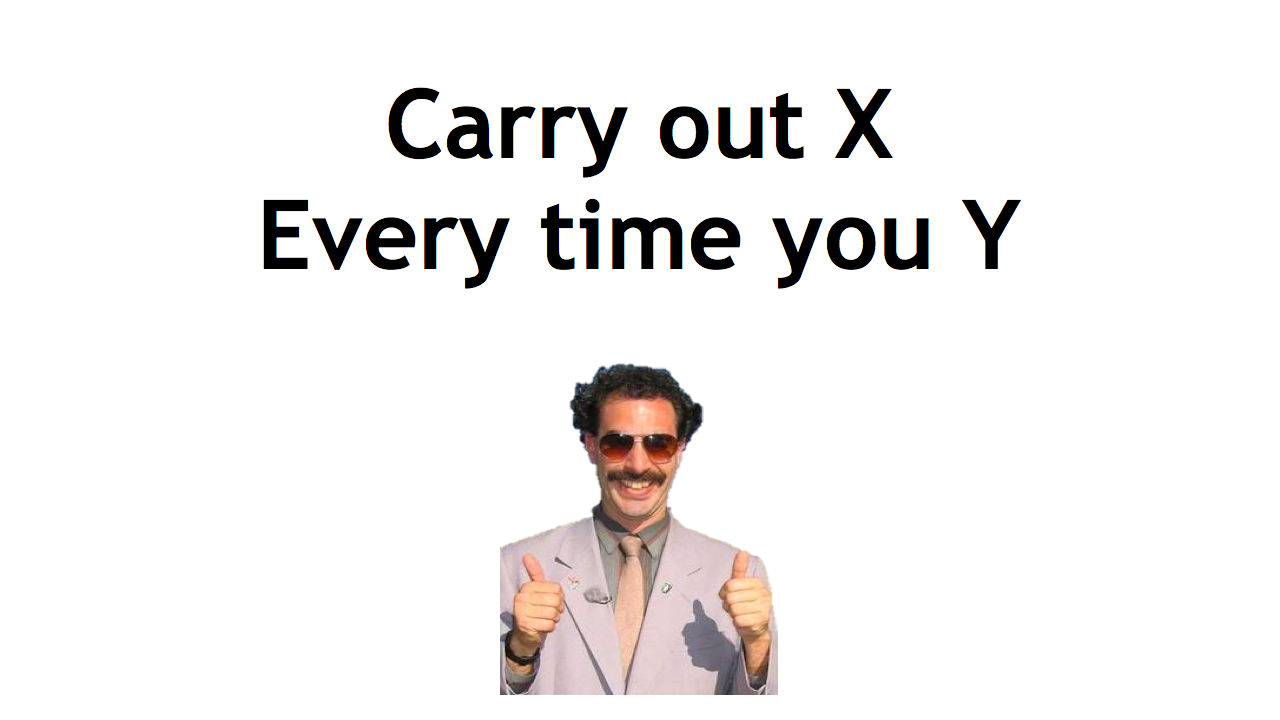
My approach? Simple, high impact and memorable. As the example below shows, not many words and a memorable picture (in the actual presentation Borat merged to Simon Cowell showing a thumbs down and back and forth). In this way, the image hits them first (thumbs up/thumbs down), the message (check X when doing Y), and that’s it! (The message has obviously been sanitised to protect the innocent).

 Of course, there were many other slides along this nature – I also used references to The Oatmeal, Dilbert and Defcon 18 amongst others. And each slide put across a very specific point.

At first glance, the deck looks awful, plain and badly designed. However, the simplicity of it ensures the message very clearly comes across with the imagery ensuring that message remains memorable.

Three things came across very strongly at the end. Firstly, the questions and comments at the end were engaging, sensible and eminently relevant. This made me very confident that the message was put across and understood, and that this approach was the correct one in this circumstance.

Secondly, the client saw this engagement, and has since requested a copy of the presentation to demonstrate how the team had been successfully “trained” and and updated on security practices.

Finally, in front of this creative audience it became crushingly obvious that I really have to up my game when it comes to clip art…


Open Letter to Apple – Why Have You Forsaken Me?

Dear Apple,

Your new MacBook Pro’s rock… the screen alone is just like moving from black and white to colour, and with the Air-like instant on, solid state disk and all round grooviness I nearly sold a kidney there and then (thank goodness the market in kidneys crashed; this could have been a very different letter).

And then, I saw it. Or more accurately I didn’t. The lozenge shaped hole of hope, that sliver of sanity, the goddam lock lead hole… It wasn’t there; in fact I looked again and it still isn’t there!

WTF Apple? What kind of insane douchebaggery is this?

You have strived and toiled and driven to be accepted into the enterprise. You have integrated with Microsoft Exchange, AD and even licensed ActiveSync for the iPhone. You have built in full disk encryption into your OS(X), allowed corporate Microsoft into your walled garden and introduced Employee Purchase Programs. In fact, you sounded like my hip godfather; all grown up and wise and everything, and yet still somewhat cool and groovy.

I even use a MacBook Pro at work for goodness sake! You make ME look cool and hipster like, and THAT is hard work I can tell you…

I tell people about how much more stable OSX is, how much more consistent the hardware is and how much more intuitive the interface is. Sure, your enterprise hardware support isn’t as good as say HP’s and Lenovo, but it is good enough, and at a pinch I just wander up to Oxford Street and chat to a Genius and they fix it anyway.
And then you announce the retina display, and all the other coolness that goes along with the new MacBooks; everyone in the office is talking about how they need one, my work and productivity depend on it, and you know what?… I ignored them because I needed one and my productivity suddenly depended on one as well…

And when I didn’t see that hole of hope, I think I died a little inside, and not just because I couldn’t lock my laptop up now, but because I will never be able to lock it in the future. This is obviously a design decision, one that was actually thought out, not just forgotten.

I have fought and fought to get my people to understand the importance of basic DLP, that is, lock your frickin laptop up, and your data will not literally walk out of the door. And in one fell swoop, you have told all of my MacBook users that it’s OK not to have a laptop lock. “If Apple don’t think it is important, why should I listen to you?”.

Godammit.

I now have to fight for extra budget for a case that screws into the chassis of the laptop that I can lock a lead to (ugly) or pieces of metal to slip between the hinge for the lock lead to attach to (screen crunchingly efficient) to get a basic security control in place. And I bet the answer will be “no” – these new Macs are expensive enough, we have encryption, why bother? Ummm, downtime, productivity, overhead of security incident reporting, cost of hardware replacement and just generally lax security practises (or “risk homeostasis” – a topic of a forthcoming presentation).

You have two choices; either reintroduce said hole, or introduce the most amazingly designed and fabulous looking security device for these laptops that I will spill £50 of my own money to buy one.

Do you dare to “think different” in this regard…

Yours sincerely,

Thom “lockless” Langford


The Simple Things – The Screensaver Lock

The principle behind the screensaver lock is that you build in a fail safe into your computer should you walk off leaving it unlocked (that is what we all do anyway, right?). The normal timing is somewhere between ten and fifteen minutes, and is more often than not enforced in organisations with an active directory policy or similar. In principle therefore, whenever your screensaver activates it requires a password to unlock the screen when you return.

It is worth noting that any mobile device such as a tablet or smartphone should also have this feature enabled, although it can also activated by switching the device off if required.

In the BYOS world of course this simply needs to be something you ensure is in place on your own computer, and the timing set to something that works for you – mine is fifteen minutes, and is harmonised into the energy saving and general computer power saving timings.

There are and will remain many objections to this kind of security control, but they can be boiled down into one of three:

1 – Presentations. I have heard on many occasions that the screensaver will kick in during a presentation, and I have some sympathy with this. I haven’t had it happen to me with a Mac (although I tend not to stay on one slide without any kind of mouse click or animation!). This can have two effects of course; either tell the audience that there are additional security controls employed by this company, or that the presenter is an amateur who can’t manage their computer during an important thing like this presentation.

This is challenging to fix – you can’t disable the lock for all who do presentations as that would expose a huge number of computers. And you can’t allow people to disable the lock themselves as it is very likely a large proportion will not reenable the lock.

The solution in my opinion is to allow by policy the disabling of the screensaver for a fixed period of time, say two hours before it gets automatically reenabled. I am not sure if this can be managed through standard AD policies or not, but it would certainly address this particular opposition.

2 – Servers and accounts. In many cases where people have sandbox environments or the like under their desks there are many requests to disable the screensaver because of batch files that run in the foreground. In every case I have observed to date this is simply because of sloppy or inexperienced implementation of the batch file. When the batch files or executables are converted to run as a service they can run very happily with the screensaver enabled.

Except in very rare circumstances this is not a reason to disable the screensaver lock.

3 – Finally there is the group of people who simply don’t like being told! This is where education, awareness and some good old fashioned face to face communication comes into its own!

Nonetheless, whatever the objection, anyone with an ounce of concern for security should consider this control on any device in a BYOD environment, and perhaps more importantly on any mobile device.